How to Verify an FBR Invoice: POS Receipts and Digital Invoices
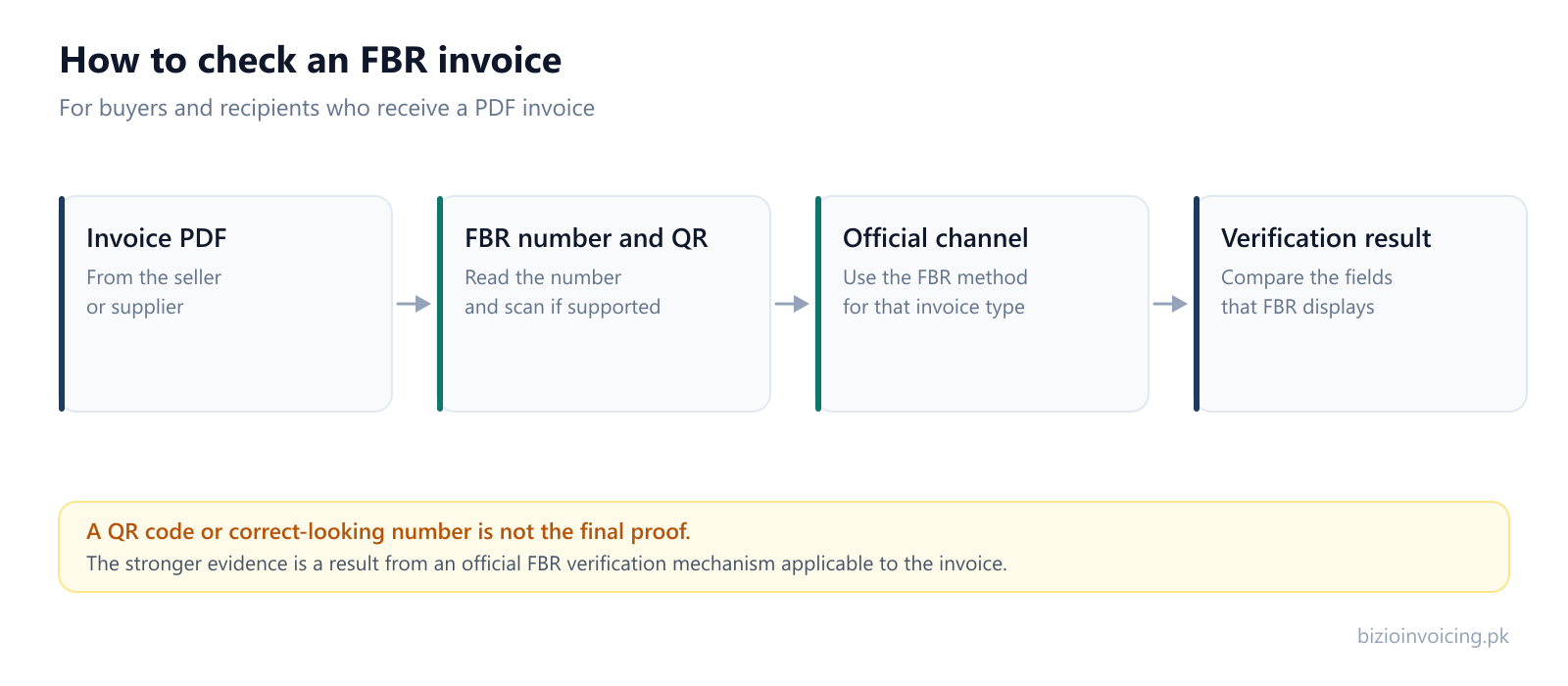
Do not judge an invoice by its appearance. Use the official FBR verification method for that invoice type, then compare the result with the document.
Which FBR verification route applies?
It depends on what kind of invoice you are holding. Pick the one that matches, use the official channel, then compare the result with the document.
A POS receipt from a shop or restaurant
FBR documents two methods for POS invoices: the Tax Asaan app (FBR POS menu, Verify Invoice, then enter the FBR invoice number or scan the QR code), or an SMS to 9966 in the format INV CNIC-number FBR-invoice-number. FBR says the result is reported as verified or unverified.
A business invoice issued through Digital Invoicing
In the official documents we reviewed, there is no public lookup that verifies every Digital Invoicing invoice by number alone. The issuer can see the invoice in their own FBR dashboard. Ask the issuer for their submission evidence — never their password or token — and contact FBR if it remains unclear.
Not sure which you have? A till receipt from a retailer is a POS invoice. An invoice between businesses carrying the Digital Invoicing logo is the second kind. A QR code that scans is not, by itself, a verification result for either.
Bizio Invoicing is an independent software provider. It is not affiliated with, endorsed by, or an official service of the Federal Board of Revenue (FBR) or PRAL. This guide is based on FBR and PRAL material rechecked on 2 October 2026. FBR's own current documents and support channels remain the authority.
A PDF can look correct
A logo, number and QR code are useful clues, but appearance is not the same as an official verification result.
The FBR response matters
PRAL's Digital Invoicing post response shows invoiceNumber, dated and validationResponse fields when a submission succeeds.
The channel depends on type
FBR clearly documents POS invoice verification. Public Digital Invoicing verification is more limited in the documents reviewed.
What Is an FBR Digital Invoice Number?
In the Digital Invoicing API, the FBR invoice number is the number returned by the FBR/PRAL system after a successful post submission. PRAL's technical specification for the Digital Invoicing API shows the post method returning an invoiceNumber, dated and a validationResponse. In the valid sample response, statusCode is 00 and status is Valid.
That is different from the seller's own internal invoice number. It is also different from invoiceRefNo, which the technical specification describes as the reference invoice number used in debit or credit notes.
Example only
FBR Invoice No: 7000007DI1747119701593
This is an example in the style shown by PRAL documentation, not a Bizio customer invoice and not proof that any real invoice exists.
How the FBR Invoice Number Is Generated
The Digital Invoicing technical specification describes two main invoice methods: postinvoicedata and validateinvoicedata. The validation method checks an invoice payload; the post method is the submission path that can return an FBR invoice number when the submission is valid.
The important point for a buyer is this: displaying a number on a PDF is not what makes the invoice genuine. The stronger evidence is the response and any official verification result available for that invoice type.
How Bizio Displays the FBR Invoice Number
Bizio Invoicing is independent invoicing software. Where FBR Digital Invoicing is configured for a business, the normal flow is:
1Business creates invoice
2Bizio prepares digital invoice data
3Invoice is submitted through the configured FBR/PRAL integration
4FBR/PRAL processes the submission
5FBR invoice number is returned for a successful response
6Bizio places the FBR invoice number on the invoice PDF
7Bizio also displays the QR code where applicable
8Customer or recipient receives the invoice
9Customer checks the available official FBR verification mechanism
Start with the invoice PDF, then use the official FBR verification method that applies to that invoice type. Appearance alone is not the same as verification.
The FBR invoice number shown by Bizio is based on the response received from the configured FBR/PRAL integration. That does not mean Bizio itself is a government verification service, and it does not mean a number printed on any PDF should be trusted without checking it through the official channel that applies.
How to Verify an FBR Invoice
First identify the invoice type. This matters because FBR's clearly documented consumer verification workflow is the POS workflow, while the Digital Invoicing documents reviewed here focus on integration, submission responses, authenticated dashboards and support.
Method
What FBR documents
Use carefully
Tax Asaan app
FBR's POS Invoice Verification page says customers can open the FBR POS menu, tap Verify Invoice, enter the FBR invoice number or scan the QR code.
Treat this as POS-specific unless FBR confirms it applies to the Digital Invoicing invoice you are checking.
SMS 9966
FBR's POS page documents sending INV CNIC FBR-invoice-no to 9966 for POS invoice verification.
Do not assume 9966 verifies every Digital Invoicing API invoice unless FBR's current guidance says so.
eFBR online services
FBR's online services portal presents official online verification services and an invoice verification area.
If the portal labels the facility as POS integration, do not treat it as proof of a universal Digital Invoicing lookup.
Seller's Digital Invoicing records
The Digital Invoicing user manual describes authenticated invoice dashboard/search features for taxpayers.
A recipient should not ask for the seller's IRIS password or PRAL token. Ask for appropriate evidence, not private credentials.
Can I Verify an Invoice Without the Seller's IRIS Login?
You should not need, request or use another taxpayer's IRIS password, PRAL/FBR security token, API token, or private account access. FBR/PRAL's technical specification describes the Digital Invoicing API as secured by a token passed in request headers. That is integration infrastructure, not something a buyer should receive from a supplier.
If an official public verification channel applies to the invoice type, use it. If the invoice is a Digital Invoicing API invoice and FBR's public documents do not expose a recipient-facing lookup for that exact case, ask the issuer for the original digitally generated invoice or submission evidence and contact FBR if the matter remains unresolved.
How to Scan the FBR Invoice QR Code
PRAL's Digital Invoicing technical specification states that the Digital Invoicing System logo and QR code must be printed on each invoice issued by taxpayers, and it specifies a QR code version and dimensions. That supports printing the QR code; it does not, by itself, mean that a scannable QR code proves the invoice exists in FBR's system.
What the QR code can help with
It can make entry or scanning easier where an official FBR channel supports QR scanning for that invoice type.
What the QR code does not prove alone
It does not replace the official verification result. A copied or damaged QR code can still scan as text or a link.
FBR Digital Invoicing vs POS Invoice Verification
This distinction is important. FBR has a documented POS Invoice Verification process for purchases from Tier-1 integrated retailers. That page specifically names Tax Asaan, QR scanning and SMS 9966, and says the user is told whether the invoice is verified or unverified.
FBR's Digital Invoicing material is different. The technical specification documents API submission, validation responses, tokens, QR-code printing and reference APIs. The user manual also describes an invoice dashboard and search features after login. In the official material reviewed for this page, Bizio did not find a public, universal, buyer-facing Digital Invoicing lookup that verifies every Digital Invoicing API invoice by number alone.
What a Verified Result Means
Treat a correct-looking PDF, a valid-looking number format, a QR code that scans, the seller's claim, or a Bizio-generated PDF as weaker evidence than a result returned by an official FBR verification mechanism. The official result is the thing to compare against the invoice in your hand.
What to Check on the PDF Invoice
Compare the fields that the official verification service displays. Not every channel necessarily exposes every field.
FBR invoice number
seller or business identity
invoice date
registration information, if shown
invoice type
amount and tax information, if shown
QR or verification result
verification status
What to Do If the FBR Invoice Cannot Be Verified
A failed or unavailable result does not automatically prove fraud. Work through simpler explanations first:
wrong invoice number entered
QR code damaged or unreadable
invoice type uses a different verification channel
temporary FBR service issue
invoice not yet visible through that verification service
invoice may not have been successfully accepted
invoice information may have been altered
outdated or unsupported verification method
incorrect or incomplete information
Recheck the FBR invoice number, scan the QR code again if a QR workflow applies, try the official FBR channel, confirm the date and seller details, ask the issuer for the original digitally generated invoice or verification evidence, and contact FBR through its official support channels if the issue remains.
How Bizio Handles FBR Invoice Numbers
Bizio is not FBR, not IRIS and not PRAL. It does not provide an independent government verification service and does not certify an invoice as legally valid. Where configured, Bizio submits invoice data through the FBR/PRAL Digital Invoicing integration and stores the response returned by that integration. If a successful response contains an FBR invoice number, Bizio can place that number on the invoice PDF and show the related QR code where applicable.
Bizio Invoicing is independent software and is not affiliated with, endorsed by, or operated by the Federal Board of Revenue (FBR) or PRAL.
Frequently Asked Questions
How can I verify an FBR invoice number?
Use the official FBR verification method that applies to the invoice type. FBR clearly documents POS invoice verification through Tax Asaan or SMS 9966. For Digital Invoicing API invoices, the public documents reviewed by Bizio do not establish one universal recipient-facing lookup for every invoice number.
Can I check if a digital invoice was submitted to FBR?
A successful Digital Invoicing post response includes an invoiceNumber and a validationResponse marked Valid. A recipient who does not have the seller's account should rely on any official public verification mechanism available for that invoice type, request verification evidence from the issuer, and contact FBR if the result remains unclear.
Can I verify an FBR invoice without the seller's IRIS account?
You should not ask for or use another taxpayer's IRIS password, PRAL token, or private credentials. If an official public verification channel applies, use that channel. If the relevant Digital Invoicing record is only visible inside the issuer's authenticated dashboard, ask the issuer for appropriate evidence and contact FBR through official support.
Can I scan an FBR invoice QR code?
The PRAL Digital Invoicing technical specification says the Digital Invoicing logo and QR code must be printed on each invoice and gives QR-code printing requirements. A QR code being present or scannable is not, by itself, the same as an official verification result.
Is Tax Asaan used for FBR invoice verification?
FBR's POS Invoice Verification page documents Tax Asaan for POS invoices from Tier-1 integrated retailers. Unless FBR separately confirms the same process for the Digital Invoicing invoice you are checking, treat the Tax Asaan/9966 instructions as POS-specific.
Is an FBR invoice number enough to prove an invoice is genuine?
No. A correct-looking number format is weaker than an official FBR verification result. Compare the official result, where available, against the PDF fields such as invoice number, seller identity, invoice date, invoice type, and amount or tax details shown by the channel.
Does Bizio verify invoices with FBR?
Bizio can submit invoice data through the configured FBR/PRAL Digital Invoicing integration and store the response returned by that integration. Bizio is independent software and does not operate an official government invoice verification service.
Official FBR/PRAL Resources
These are the official resources used for this page. Avoid treating unofficial invoice-checking websites as government verification services.
Tell us your business name and registration number and we will set up your account. You start in sandbox mode, so nothing is filed for real until you are ready to switch to production.