PRAL API Integration: How Invoices Reach FBR in Real Time
Technical guide to PRAL API integration for FBR digital invoicing in Pakistan: IRIS onboarding, OAuth 2.0 authentication, sandbox testing, and JSON invoice submission.
Bizio Invoicing is an independent software provider. It is not affiliated with, endorsed by, or an official service of the Federal Board of Revenue (FBR) or PRAL. This page describes a technical integration, not a relationship. For the requirements themselves, FBR's own published material is the authority.
The path an invoice takes
Four parties are involved, and they are often spoken about as if they were one. They are not, and the difference decides who is responsible for what.
- Your business
- Issues the invoice, owns the data on it, and holds the sales tax registration it is filed under. Responsible for the invoice being correct.
- Bizio Invoicing
- Independent software. Collects the invoice in the structure the API expects, checks it, calls the API with your credentials, and stores what comes back.
- PRAL
- Pakistan Revenue Automation (Pvt) Limited, which operates the digital invoicing API that submissions are made to. We are a client of that API, nothing more.
- FBR
- The Federal Board of Revenue, the tax authority whose digital invoicing system the invoice is recorded in, and which sets the rules an invoice has to satisfy.
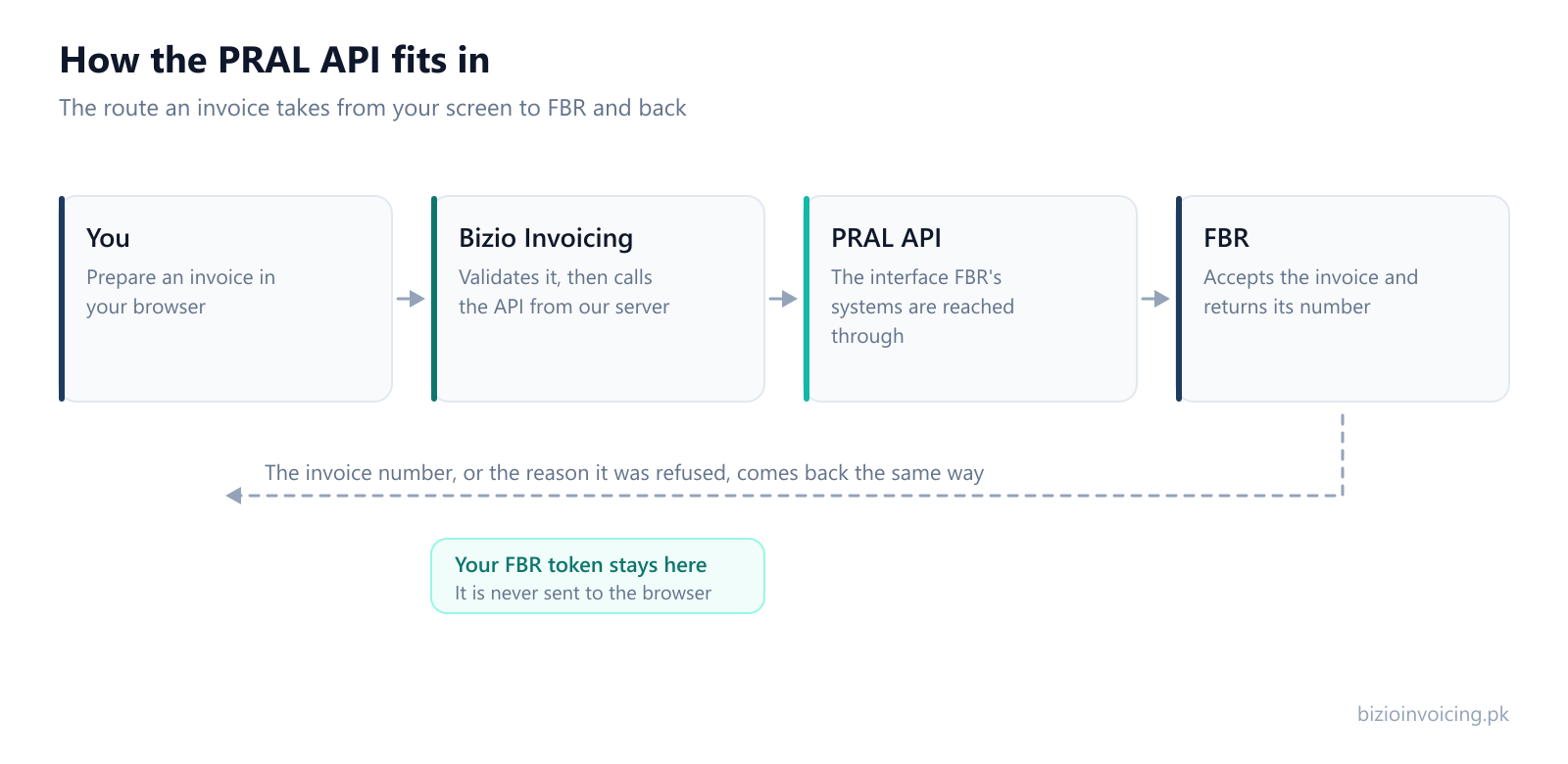
In order, an invoice goes from your business, to Bizio Invoicing, to the PRAL-operated API, into FBR's digital invoicing system. Each step is a step and none is skipped. We do not operate that API, we are not part of PRAL, and we have no say in what it accepts.
Whose credentials are used
Yours. Submissions are made against your own digital invoicing credentials — the token issued for your NTN or CNIC — which an authorized administrator configures in Settings. We do not file under a shared or pooled account, and we cannot file for a business that has not supplied its own token.
Sandbox and production tokens are stored separately, so switching environments cannot file a test invoice for real. The token is held on our server and is never sent back to the browser. What that means for your data is set out in the privacy policy.
How to obtain PRAL credentials in IRIS
To integrate with the PRAL API, your business must register through FBR's IRIS portal:
- Log in to IRIS: Access iris.fbr.gov.pk using your business NTN and password.
- Navigate to Digital Invoicing: Go to the Registration tab and locate the Digital Invoicing integration section.
- Select PRAL as Integrator: PRAL is the default, government-backed integrator option and provides API connectivity without third-party vendor licensing fees.
- Generate Credentials: Accept the terms to generate your unique
Client IDandClient Secret.
What happens on each API call
For the API specification itself, use FBR's technical documentation.
Under the hood, the PRAL API uses OAuth 2.0 authentication. The system sends an authorization request to PRAL's token endpoint (/pdi/v1/token) to obtain a temporary Bearer access token (typically valid for one hour). Subsequent requests use this token in the HTTP Authorization header.
An invoice moves through a fixed set of states, and each one tells you exactly how far it has travelled:
- Draft
- Saved in Bizio and sent nowhere. Nothing has left your account at this point.
- Valid / Needs fixes
- The result of the local check. This runs on our side and calls no API — it catches missing and inconsistent fields before anything is sent.
- FBR validated / FBR rejected
- The result of the validation call. The invoice is sent to be checked and is not filed. A rejection comes back with its reason, shown against the field it belongs to.
- Submitted / Submit failed
- The result of the submission call — the deliberate, separate step that actually files the invoice. The response is stored with the invoice either way.
The useful property of that sequence is that validating (/pdi/v1/validate) and submitting (/pdi/v1/invoices) are two different calls. You can find out whether an invoice would be accepted without filing it, which is the whole point of having a check step at all.
When an invoice is successfully submitted to PRAL, the response returns an official FBR Invoice Reference Number (IRN) and QR code string, which Bizio renders onto compliant, printable PDF invoices.
What this integration does not do
- It does not make your business compliant. Whether a filing requirement applies to you, and whether the figures on an invoice are right, are questions for you and your tax consultant.
- It does not change what the API accepts. If a submission is rejected, the rejection came from the other end. We show you the reason; we cannot overrule it.
- It does not file your sales tax returns. This is invoicing, and only invoicing.
- It does not confer any status you did not have. Your registration and your credentials are yours. Software does not grant them.
Frequently asked questions about PRAL API integration
- What is the PRAL API for FBR digital invoicing?
- The PRAL API is the official REST API operated by Pakistan Revenue Automation (Pvt) Limited on behalf of FBR, enabling registered taxpayers' invoicing software to validate and submit sales tax invoices in real time.
- How do I get PRAL API credentials for my business?
- Log in to FBR's IRIS portal (iris.fbr.gov.pk) with your NTN credentials, navigate to the Digital Invoicing registration section, select PRAL as your integrator, accept the terms, and generate your Client ID and Client Secret.
- Is PRAL integration free of charge?
- Yes. PRAL serves as the default government-backed integrator and does not charge taxpayers licensing fees for API access. Software vendors provide the user interface and system integration.
- What is the difference between FBR sandbox and production API endpoints?
- The sandbox environment lets developers and taxpayers test simulated transactions using test scenario IDs (SN001–SN028) without creating legal tax liabilities. The production environment records live legal sales tax invoices.
Where to read next
If you are still working out what digital invoicing is and whether it applies to you, start with the guide to FBR digital invoicing. To see the same integration from the user's side rather than the wire's, the step-by-step walkthrough covers setting up a business, connecting a token and filing a first invoice. The FAQ answers what businesses ask most often before they start.
Read next
FBR digital invoicing, explained
What the system is, what an integrated invoice carries, and the terms you will meet on your first one.
Testing in FBR's sandbox
Exercise the integration end to end against FBR's test environment before anything counts.
Why FBR rejects an invoice
What comes back when a call is refused, and which of the six families it belongs to.
Ready to file your first invoice?
Tell us your business name and registration number and we will set up your account. You start in sandbox mode, so nothing is filed for real until you are ready to switch to production.
WhatsApp +92 339 4453223 · bizio.official1@gmail.com