FBR digital invoicing software for Pakistan
Bizio Invoicing is independent invoicing software for Pakistani businesses. Prepare sales invoices or upload them from Excel, validate with FBR in real time, generate compliant QR-coded PDF invoices, and submit directly through the PRAL API.
- Real-time FBR validation & PRAL API submission
- Official FBR invoice number & QR code PDF generation
- Excel batch upload on Premium & a separate sandbox mode
Our team sets up your account. Start with a message to discuss your plan and sandbox setup. Need background first? Read our FBR digital invoicing guide or check how to choose invoicing software.
Plans from PKR 3,000/month with unlimited customers, products and invoices. One-time integration: PKR 10,000, or PKR 5,000 if your FBR sandbox testing is already cleared. Compare plans
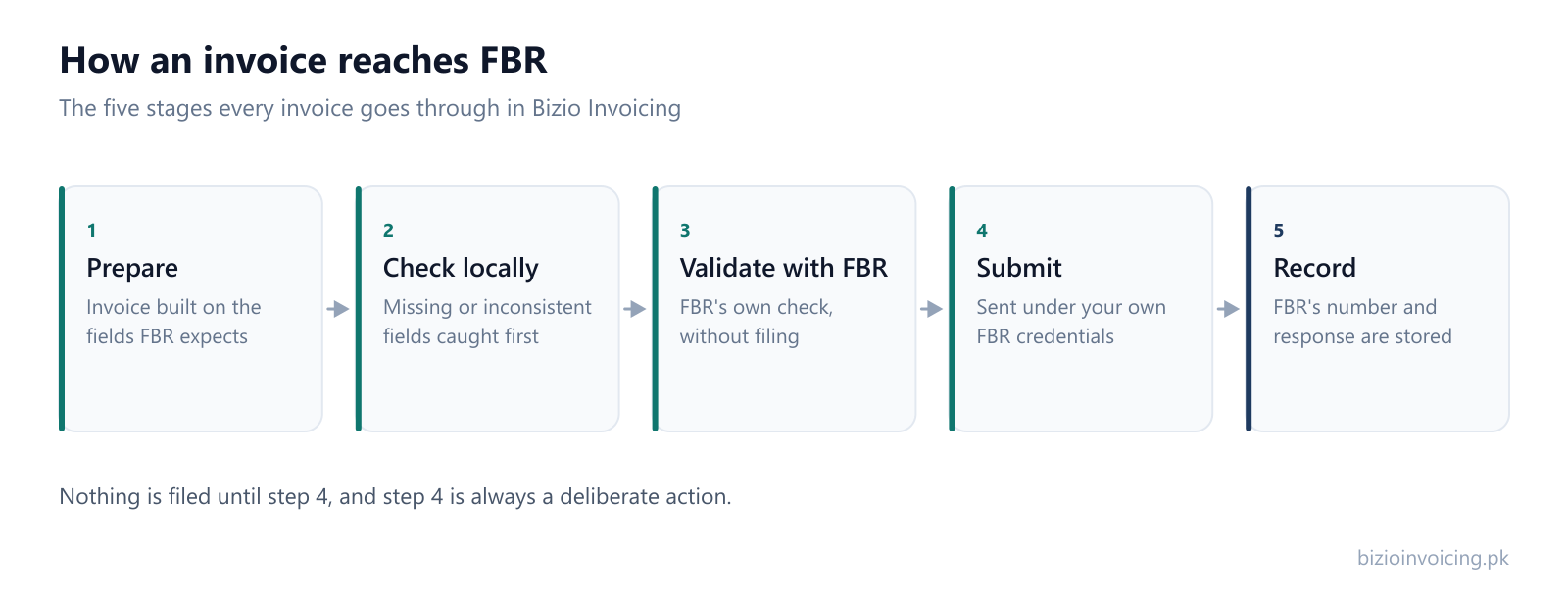
Three steps from invoice to filed
The process is the same every time, whether you file one invoice a week or a hundred a day.
1. Prepare the invoice
Enter customer, seller and line-item details in a form built around the fields FBR expects — or upload FBR's Excel template for a whole batch at once.
2. Validate, then submit
Check the invoice locally and against FBR before filing, so fewer submissions come back rejected. Submitting is a deliberate, separate step.
3. Keep the record
Every submission is stored with its status and FBR's response, so you can find what was filed, when, and under which invoice number.
Everything the filing needs, in one place
What it takes to prepare an invoice, send it, and prove later that you did.
File a whole month of FBR invoices from one Excel file
Stop entering invoices one at a time. Upload the supported Excel template once, validate the whole batch with FBR, and submit when you are ready.
One upload
Rows that share a document number, date, type and buyer become one multi-item invoice.
One click to validate the batch
Every eligible invoice is checked with FBR without filing, so problems surface first.
Runs while you do something else
Validation and submission run on our servers — close the tab and come back to the results.
Nothing filed twice
A retry skips invoices that already have an FBR invoice number.
Handling tax data carefully
Filing invoices means handling credentials and financial records. Here is how Bizio Invoicing is set up to hold them.
Filed from the server
Invoices are sent to FBR by our backend. The browser never talks to FBR directly.
Tokens stay server-side
Your FBR digital invoicing token lives on the server and is never included in anything we send to the browser.
Managed sign-in
Sign-in is handled by Google Firebase Authentication, so your password is never stored by us.
Built on FBR's digital invoicing system, with a sandbox mode to try before you file for real.Read the privacy policy
Questions people ask before they start
The short answers. The full FAQ goes further.
What is FBR digital invoicing?
It is the Federal Board of Revenue's system for receiving sales invoices electronically. Instead of only keeping an invoice in your own records, your business sends its details to FBR through an API, and FBR returns a reference number for the invoice it has accepted.
Does my business have to integrate with it?
FBR decides which categories of registered persons must integrate, and by when. Those requirements are set out in FBR's own notifications and have changed more than once. Check FBR's current notifications or ask your tax consultant whether your business is in scope — we cannot make that determination for you.
What does Bizio Invoicing actually do?
It gives you a place to prepare an invoice against the fields FBR expects, checks it before anything is filed, submits it to FBR on your behalf, and stores the submission together with FBR's response. It does not replace your accounting software or file any return for you.
Is Bizio Invoicing part of FBR or PRAL?
No. Bizio Invoicing is an independent private software product. It is not affiliated with, endorsed by, or an official service of the Federal Board of Revenue or PRAL, and it is not a government website. PRAL operates the digital invoicing API that submissions are made to; we are a client of that API, submitting under your business's own credentials.
Do I need my own FBR token?
Yes. Submissions use your business's own FBR digital invoicing credentials; Bizio does not issue tokens. An authorized administrator configures them in Settings. The stored token is not returned to the browser.
What is sandbox mode?
Sandbox is FBR's test environment. Invoices filed in sandbox are not real filings, so you can practise the whole process first. Your account starts in sandbox, and production filing is switched on separately once you are ready.
What happens if FBR rejects an invoice?
The rejection is shown against that invoice with the message FBR returned, and the invoice stays in your history in that state. You can correct the details and submit again. Invoices are also checked locally and against FBR before filing, which catches many problems earlier.
How do I get an account?
Accounts are set up by our team rather than through a public sign-up form. Message us on WhatsApp or by email with your business name and registration number, and we will create the account and send you the sign-in details.
How much does it cost?
Essential is PKR 3,000/month or PKR 30,000/year, and Premium is PKR 5,500/month or PKR 55,000/year. Both include unlimited customers, products and invoices; Premium adds Excel batch invoice upload and advanced filters. One-time integration is PKR 10,000, reduced to PKR 5,000 if your FBR sandbox testing is already cleared. Subscription charges are separate. Multiple business accounts or more specific requirements are handled as a Custom package — see the pricing page for the full breakdown.
Ready to file your first invoice?
Tell us your business name and registration number and we will set up your account. You start in sandbox mode, so nothing is filed for real until you are ready to switch to production.
WhatsApp +92 339 4453223 · bizio.official1@gmail.com