FBR HS Code List: Official Lookup and Unit of Measure (UOM)
Find official FBR HS-code references, understand valid units of measure, and troubleshoot code/UOM mismatches when preparing digital invoices.
Where to find the FBR HS code list
There are two official places to look, and they answer different questions.
- The code itself: Pakistan Customs Tariff FY 2026-27 (PDF, published by FBR). It lists every PCT code with its description and customs duty. It is a customs document: it does not list sales tax rates or the units of measurement digital invoicing accepts.
- The code and unit FBR accepts on an invoice: the reference APIs in PRAL's Digital Invoicing API specification v1.12 —
itemdesccode(section 5.3) for codes and descriptions, andHS_UOM(section 5.9) for the units allowed with one code. Both need your own FBR token, so they are read through your invoicing software rather than a public web page.
Both were checked on 2 October 2026. FBR can publish newer editions; the Digital Invoicing technical assistance page links whichever specification is current.
How to find and confirm a code
- Start from paperwork you already have. Goods that have been imported or exported carry a PCT code on their customs documents.
- Otherwise search the tariff by description. Find the four-digit heading that describes the goods (for example
48.02), then the full eight-digit line beneath it (for example4802.5600). - Use the full code. A heading on its own is not a line item; FBR's own sample invoices carry the eight-digit form.
- Check the unit FBR allows for that code before you settle on one — see below.
- Validate an invoice before submitting it. Validation is where a code and unit that do not go together are reported.
If you are not sure which heading your goods fall under, that is a question for your tax consultant or clearing agent. Classify once, record it against the product, and the decision stops recurring.
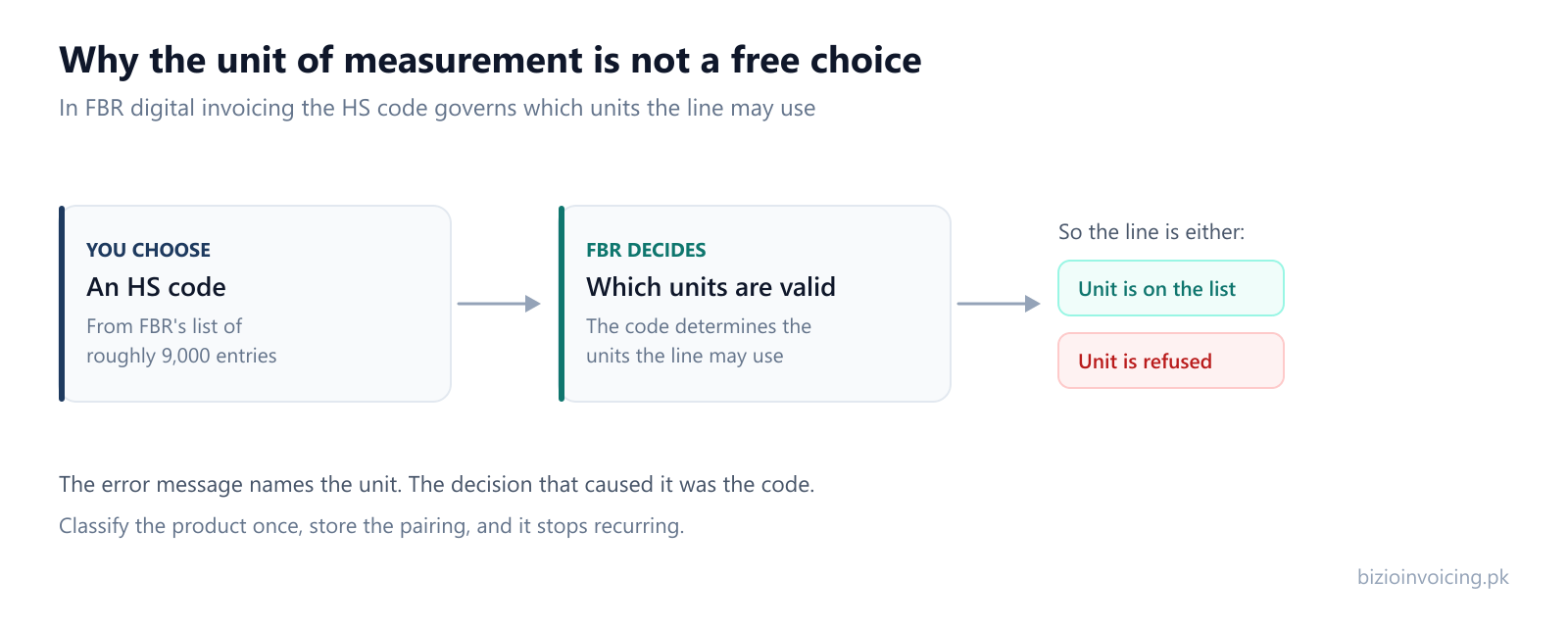
The unit of measurement is not a free choice
This is the part that catches most businesses out. FBR publishes which units of measurement are valid for a given HS code. Kilograms, litres, square metres, numbers of pieces — which of them your line may use is determined by the code you filed it under, not by how your own stock records count the item.
So a line can be refused even though the code is right and the unit is a perfectly ordinary unit, simply because that pairing is not one FBR recognises. The error you see is about the unit; the decision that caused it was the code.
A worked example from FBR's own documentation
Section 5.9 of the specification shows the lookup with a real code. The request asks which units go with 5904.9000:
GET /pdi/v2/HS_UOM?hs_code=5904.9000&annexure_id=3

[
  { "uoM_ID": 77, "description": "Square Meter" }
]
In the FY 2026-27 tariff, 5904.9000 is the “Other” line under heading 59.04, floor coverings on a textile backing. On an invoice line that pairing becomes two fields:
hsCode:5904.9000uoM:Square Meter
This is the documentation's sample, reproduced to show how the two fields relate. It is not a statement about your goods, and it says nothing about the rate or sale type — the response your own token receives on the day is what counts.
Error 0099: the unit does not match the code
Section 7 of the specification lists 0099 as “UOM is not valid. UOM must be according to given HS Code.”
- What you see: validation or submission returns 0099 against a line.
- What to check: the HS code on that line, then the units FBR returns for that exact code. A unit appearing in the general unit list does not make it valid for your code.
- Safe correction: if the code is right, pick one of the units returned for it and convert the quantity to match. Do not change the code just to make a familiar unit fit.
- Then: validate again before submitting.
- If the classification itself is in doubt: stop and ask your tax adviser. A different code can change the tax treatment, not only the unit.
Two neighbouring codes are narrower: 0096 (“For provided HS Code, only KWH UOM is allowed”) and 0097 (“Please provide UOM in KG”). The guide to FBR rejections covers the other families.
What else hangs off the line
The HS code is one of several fields that only make sense together. On any given line:
- The unit has to be one FBR accepts for that HS code.
- The rate follows from the sale type — and, for some transactions, from the province the supply is made in.
- An SRO reference, where a notification sets a special rate or an exemption, has to name both the schedule and the item serial inside it.
- The description should correspond to the code it is filed under, not contradict it.
Get one of these wrong and the invoice comes back. Get the code wrong and several of them can be wrong at once, which is why a rejection quoting a unit or a rate sometimes turns out to be a classification problem.
Services, Chapter 99 and the number 9966
Goods and services are classified in different places, and it is worth keeping them apart.
- Goods are classified in the Pakistan Customs Tariff. Chapter 99 of the FY 2026-27 tariff holds special classification provisions for particular kinds of import; it is not a list of services.
- Services taxed by a province are classified in that province's own schedule. As one example, the First Schedule to the Punjab Sales Tax on Services Act lists its own headings for each service. That document shows how one authority classifies services; it is not a recommendation for your invoice, and other authorities and later amendments differ. Check the authority, the schedule and its effective date.
- 9966 is documented by FBR as the SMS number for verifying POS invoices. This guide does not treat it as a service classification, because we have found no official source that establishes it as one. If you are checking a receipt rather than classifying a sale, see how to verify an FBR invoice.
Whatever you sell, the code on a digital invoice line still has to be one FBR's item reference returns, paired with a unit it accepts.
How Bizio Invoicing handles it
- The code comes from FBR's list, not from typing. The HS code field searches FBR's item reference, so a transposed digit is caught before it reaches an invoice.
- The invoice line asks FBR which units fit the code. Once a code is chosen, the line requests the units FBR lists for it. If that lookup returns nothing, the line falls back to the general unit list — and a unit picked from the general list has not been checked against the code. Validate with FBR before you rely on it.
- Codes stick to products. A saved product keeps its HS code, unit, sale type and rate, and fills them into future invoice lines. The product form offers the general unit list, so confirm the pairing once on a validated invoice.
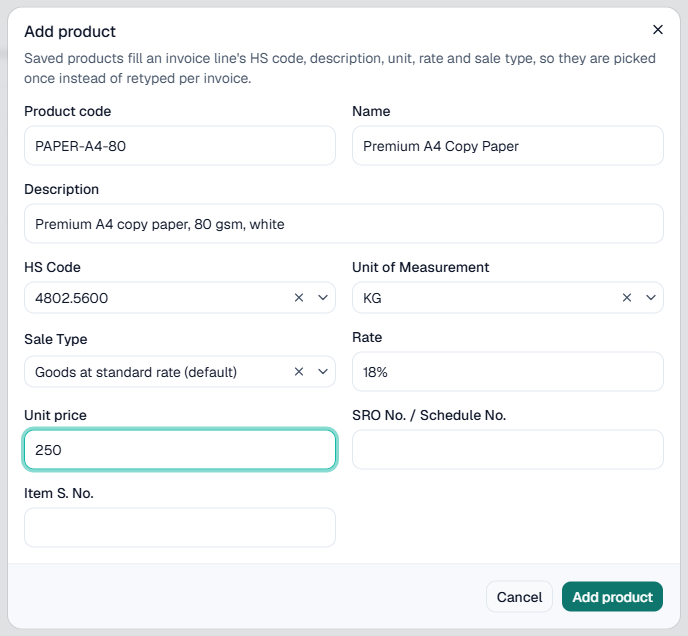
What it will not do is choose the code. That decision is yours, and it is one worth making carefully — see the terms on why we are software rather than tax advisers. If you want to see where saved products fit, the feature list and pricing cover the rest.
Sources and review
- Pakistan Customs Tariff FY 2026-27 (FBR): code format, headings 48.02 and 59.04, Chapter 99.
- Technical Specification for DI API v1.12 (PRAL): the
hsCodeanduoMfields in section 4, reference APIs 5.3, 5.6 and 5.9, and error codes 0096, 0097 and 0099 in section 7. - POS Invoice Verification (FBR): the 9966 SMS service.
- Punjab Sales Tax on Services Act 2012, First Schedule (Punjab Revenue Authority): an example of a provincial service classification.
Checked against those documents by the Bizio Invoicing team on 2 October 2026. The statements about how Bizio Invoicing behaves describe the current product. This page has not been reviewed by a tax professional and is not tax advice; to report an error, contact us.
Bizio Invoicing is an independent software provider. It is not affiliated with, endorsed by, or an official service of the Federal Board of Revenue (FBR) or PRAL. FBR's current documents remain the authority.
Frequently asked questions about FBR HS codes & UOM
- What is an HS code in FBR digital invoicing?
- It is the classification code entered on each invoice line. PRAL's Digital Invoicing API specification describes the hsCode field as the Harmonized System code of the product and shows it in the eight-digit format used by the Pakistan Customs Tariff, such as 0101.2100.
- Where can businesses find the official FBR HS code list?
- FBR publishes the Pakistan Customs Tariff, which lists PCT codes with their descriptions; the edition checked for this guide is the FY 2026-27 tariff. For digital invoicing, the codes and the units accepted for each one come from FBR's item-code and HS-code-with-UOM reference APIs, which need the taxpayer's own FBR token.
- What does FBR error 0099 mean?
- Section 7 of PRAL's Digital Invoicing API specification v1.12 lists error 0099 as: UOM is not valid. UOM must be according to given HS Code. It means the unit on the line is not one FBR accepts for that line's HS code. Codes 0096 and 0097 are narrower cases, for HS codes that only allow KWH and for lines that must use KG.
- Is 9966 an HS code?
- FBR documents 9966 as the SMS number for verifying POS invoices. Bizio has not found an official source that establishes 9966 as a nationwide classification code for any service, so this guide does not recommend it as one. A service's classification comes from the schedule of the authority that taxes it, which has to be checked for the province and date concerned.
Read next
Why FBR rejects an invoice
Classification is one of six families of rejection. Here are the rest, and what each usually means.
Testing in FBR's sandbox
Try your real product list against FBR's validations before a single filing counts.
Provincial codes and buyer types
The province names and numeric codes the rate lookup and invoice fields use.
Ready to file your first invoice?
Tell us your business name and registration number and we will set up your account. You start in sandbox mode, so nothing is filed for real until you are ready to switch to production.
WhatsApp +92 339 4453223 · bizio.official1@gmail.com