FBR digital invoicing, explained
Comprehensive guide to FBR digital invoicing in Pakistan: how real-time e-invoicing works, legal requirements, mandatory invoice fields, and PRAL API integration.
This is general background written by a software company — not tax advice, and not an official FBR publication. Requirements, dates and categories are set by FBR and do change. Confirm anything that affects your filings against FBR's own notifications or with your tax consultant.
What digital invoicing means
Under FBR's digital invoicing system, a sales invoice is not only written into the seller's own books. Its details are sent electronically to the Federal Board of Revenue through an API when the invoice is issued, and FBR answers — either accepting the invoice and returning a number for it, or rejecting it with a reason.
The practical effect is that an invoice has to be complete and correctly coded at the moment it is issued. Fields that used to be tidied up later — a product classification, a unit, a buyer's registration number — now decide whether the invoice is accepted at all.
Whether it applies to your business
FBR sets out which categories of registered persons have to integrate, and by when. Those categories and dates have been revised more than once, and they are not the same for every kind of business.
We deliberately do not publish a list of deadlines here, because a stale list is worse than none at all. Check the digital invoicing legal provisions published by FBR, or ask your tax consultant, to find out where your business stands. FBR also publishes technical documentation for digital invoicing integration.
What an integrated invoice carries
Beyond the amounts, an invoice submitted to FBR carries what FBR needs in order to classify the transaction:
- Seller details — name, registration number, province and address, matching the sales tax registration.
- Buyer details — name, registration number and registration type, and province.
- Document details — the document type, the invoice number and date, and, for a debit or credit note, a reference to the invoice it relates to.
- Line items — description, HS code, quantity and unit of measurement, unit price, sale type, rate, and the tax amounts that follow from them.
- Any special treatment — where a notification sets a different rate or an exemption, the SRO schedule and the item serial within it.
Sandbox and production
FBR provides two environments. Sandbox is for testing: you can submit invoices, watch how the validations behave, and correct your data without any of it being a real filing. Production is live: an accepted invoice is a filed invoice.
They use separate credentials, which is why any software worth trusting keeps the two tokens apart and makes moving to production a deliberate decision rather than a setting someone can flip by accident.
What usually goes wrong
- A buyer's registration number that does not match FBR's records, or a province that does not match the address.
- An HS code or unit of measurement that is close to right but is not one of the values FBR accepts for that item.
- A sale type and rate combination that do not go together, or an SRO reference quoted without its item serial.
- Invoice numbers that repeat, or notes that reference an invoice which was never accepted in the first place.
None of these are exotic. They are ordinary data-entry problems that only became expensive once an external system started refusing the invoice.
The terms you will meet
- NTN / CNIC
- The registration number a business or person is registered under. It identifies the seller, and the buyer, on the invoice.
- HS code
- The Harmonized System code that classifies the goods being sold. FBR expects the right code for the item, not an approximation.
- Sale type
- The category the transaction falls into, which determines how it is taxed. FBR publishes the list of valid values.
- Unit of measurement
- How the quantity is counted — kilograms, litres, numbers of pieces. It has to come from FBR's list, not free text.
- SRO schedule and item serial
- Where a notification sets a special rate or an exemption, the schedule and the specific entry within it that authorises the treatment.
- Sandbox
- FBR's test environment. Invoices filed there exercise the whole process but are not real filings.
- Production
- FBR's live environment. An invoice accepted here is a filed invoice, with a number assigned by FBR.
Where Bizio Invoicing fits
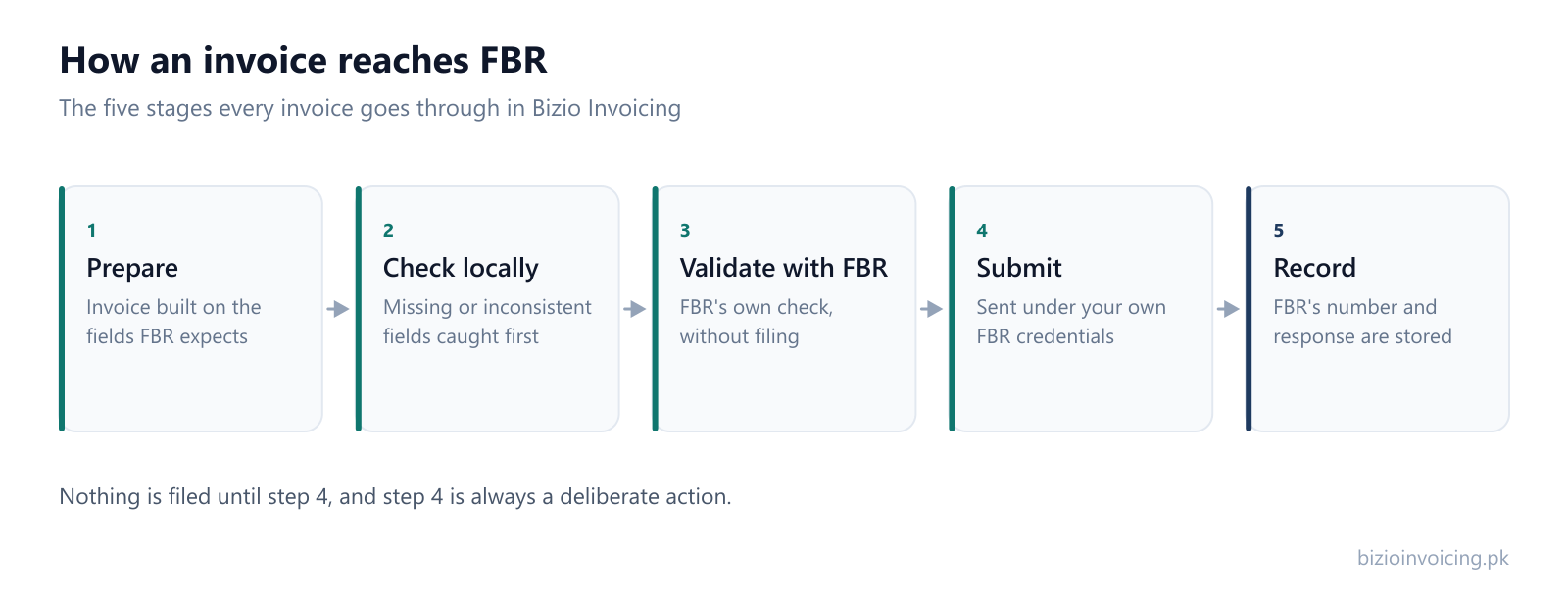
Bizio Invoicing is one of the private products that sits between a business and FBR's API. It gives you a form built on the fields above, checks an invoice locally and with FBR before anything is filed, submits it under your own FBR credentials, and keeps the response so you can show later what was sent.
Explore our step-by-step guides to prepare for compliance: upload a month of invoices at once with our Excel bulk upload guide, understand how invoice validation works before submission, and review the full FBR invoice requirements checklist.
It does not decide your tax treatment for you, and it does not make your business compliant on its own — that still depends on the details you enter being right. See how it works, or ask us a question.
Frequently asked questions about FBR digital invoicing
- What is FBR digital invoicing in Pakistan?
- FBR digital invoicing is an electronic invoicing regime where sales tax registered businesses transmit invoice data in real time to the Federal Board of Revenue through an API operated by PRAL, receiving an official FBR invoice number and QR code.
- Who is required to implement FBR digital invoicing?
- FBR mandates digital invoicing in phases for sales tax registered persons, starting with Tier-1 retailers, large taxpayers, corporate entities, registered manufacturers, importers, and designated business sectors specified in official FBR sales tax general orders and SROs.
- How does digital invoicing differ from sending a PDF invoice?
- A standard PDF invoice is an unstructured electronic document stored only in the seller's own system. A digital invoice is structured JSON data validated and registered with FBR's tax server in real time before reaching the buyer.
- What happens if an invoice is rejected by FBR?
- When FBR rejects an invoice, PRAL returns specific error codes identifying the field at fault (such as an invalid buyer NTN, mismatched HS code and unit, or incorrect tax rate). The invoice is not recorded as filed until corrected and re-submitted.
Read next
Testing in FBR's sandbox
How to run the whole process against FBR's test environment before a single filing counts.
Why FBR rejects an invoice
The six families of rejection, what each one usually means, and how to stop them recurring.
How the PRAL API fits in
The route an invoice takes from your screen to FBR, and whose credentials are used along the way.
FBR invoice requirements
The blocks of information a compliant invoice has to carry, as a practical checklist.
Digital invoicing in Pakistan
The wider shift to electronic invoicing for Pakistani businesses, in plain language.
Ready to file your first invoice?
Tell us your business name and registration number and we will set up your account. You start in sandbox mode, so nothing is filed for real until you are ready to switch to production.
WhatsApp +92 339 4453223 · bizio.official1@gmail.com